

Model CT-1
Professional Intercom Features.
Zero Hardware.
CrewTalk replaces radio rentals, scattered group chats, and expensive intercom rigs with a single app that does voice, video, text, and multi-channel monitoring — on the phone already in your pocket.


Push-to-Talk That Actually Works
Instant, crystal-clear voice communication at the press of a button. No ringing, no waiting, no "can you hear me now." Powered by a custom low-latency audio engine — not the sluggish JavaScript layer most apps rely on — every transmission lands with sub-100ms latency. Press the button, feel the haptic confirmation, and start talking. Your voice hits every connected teammate's speaker instantly.
- 10 independent named channels per hub — Camera, Sound, Lighting, whatever your team needs
- Live animated waveform shows who's talking — four selectable visual styles
- Real-time connection quality indicator so you know your coms are solid
- Auto-reconnect handles dropouts silently — you never lose contact

Monitor Up to Six Channels at Once
This is the feature that changes the game. On a traditional walkie-talkie, you're stuck on one channel. If something critical happens on another channel, you miss it entirely. CrewTalk lets you monitor up to five additional channels on top of the one you're broadcasting on — six total streams of live audio mixed together and delivered to your ear in real time. Your active channel gets a clarity boost so it always cuts through. This is the kind of capability that used to require a $3,000 Clear-Com beltpack and a hardwired intercom system.
- Your broadcast channel plus five monitored channels — simultaneously
- Active channel gets a clarity boost so it always cuts through the mix
- Tap any monitored channel to switch to it instantly and respond
- No other PTT app on the market offers true multi-channel monitoring

Latch Talk — Hands-Free Broadcasting
Sometimes you need both hands. A director blocking a scene. A crane operator calling out movements. A site foreman walking a crew through a procedure. Double-tap the PTT button to lock your microphone open — no need to hold anything. Your voice broadcasts continuously until you tap once to release. It works from the on-screen button and from Bluetooth headsets. Safety is built in: if you lose connection, start a private call, or an admin revokes your access, Latch Talk automatically disengages. This is how professional broadcast intercoms have worked for decades — and now it's in your app.
- Double-tap to latch, single tap to release — on-screen or Bluetooth
- Auto-safety: disengages on disconnect, incoming call, or admin revocation
- Hub admins can enable or disable per member for full control
- Visual amber indicator with "LATCHED" label so everyone knows you're live

Whisper — Private Conversations, Instantly
Not every conversation belongs on an open channel. When you need to pull someone aside — to discuss a script change, coordinate a surprise, or handle a sensitive issue — Whisper gives you a private, full-duplex voice call with a single tap. Unlike PTT, both parties talk and listen simultaneously, just like a phone call. The connection is peer-to-peer for exceptional quality and minimal latency. A floating overlay keeps you connected while you navigate the rest of the app.
- One-tap initiation from the crew roster — no number to dial
- Full-duplex — both parties talk and listen at the same time
- Minimizable call overlay — keep using the app while you talk
- Encrypted peer-to-peer connection with automatic network optimization

Live-Sight — Show, Don't Tell
Some things are impossible to describe with words alone. "The cable run by the east wall" could mean a dozen things. Live-Sight eliminates the guesswork by letting you share a live HD video feed with any team member, along with full-duplex audio so you can talk through what you're seeing. Whether you're showing a director the framing on a monitor, pointing out a structural concern to an engineer, or walking a remote supervisor through a setup — Live-Sight turns "let me try to explain" into "let me show you."
- HD video with adaptive bitrate that adjusts to your connection
- One-tap camera flip between front and rear — no renegotiation delay
- Draggable picture-in-picture window for your local camera
- Full-duplex audio included — talk while you show

Text & Image Messaging
Voice is fast, but some information needs to stick around. Call sheets, reference photos, location pins, equipment serial numbers — these are the details that get lost when they're spoken once and forgotten. Send text and images to any channel or directly to any crew member, and every message is stored locally on-device for instant recall. Snap a photo from the camera or pull one from your gallery, and it's delivered in seconds. It's not a replacement for voice — it's the complement that makes voice communication complete.
- Channel messages and private direct messages in one interface
- Share photos from camera or gallery — compressed and delivered in seconds
- Messages persist across sessions — scroll back and find yesterday's notes
- Typing indicators, unread badges, and date separators keep you oriented

All Call & All Text — Command the Room
Some messages can't wait for people to check the right channel. All Call lets an admin broadcast live audio to every channel in the hub simultaneously — every member hears you, no matter what channel they're tuned to. All Text does the same for written messages: a full-screen banner delivered to every member that requires acknowledgment before it can be dismissed. No one can ignore it, minimize it, or claim they didn't see it. When the stakes are high and every second counts, these are the tools that cut through the noise.
- All Call broadcasts your voice to every channel at once
- All Text displays a full-screen banner that requires "ACKNOWLEDGE" to dismiss
- Gated to admin and owner roles — no risk of misuse
- Perfect for company moves, safety stand-downs, and schedule changes
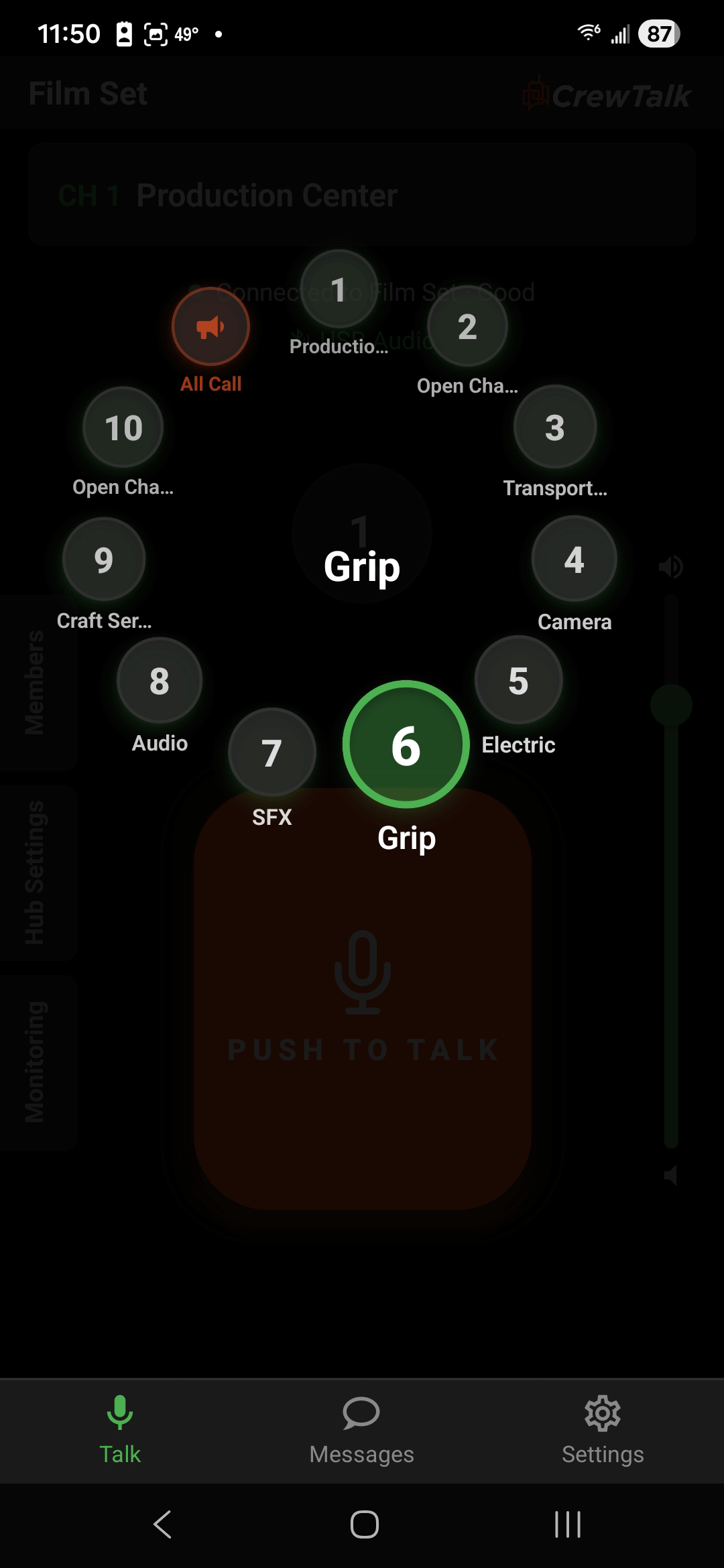
Innovative Channel Selection Dial
Forget scrolling through dropdown menus or tapping through numbered lists. CrewTalk's channel dial puts all ten channels on screen at once in a circular layout that mirrors the way real intercom systems work. Your active channel is front and center with the PTT button directly below it. Need to jump to Camera? One tap. Need All Call? It's right there in the ring. Every channel shows its name, number, and activity at a glance — no hunting, no guessing, no wasted seconds when the director calls "standby."
- All ten channels visible at once — tap any channel to switch instantly
- Active channel highlighted with name and number — always know where you're broadcasting
- All Call button integrated directly into the dial for one-tap emergency access
- Side tabs for Members, Hub Settings, and Monitoring — everything one swipe away
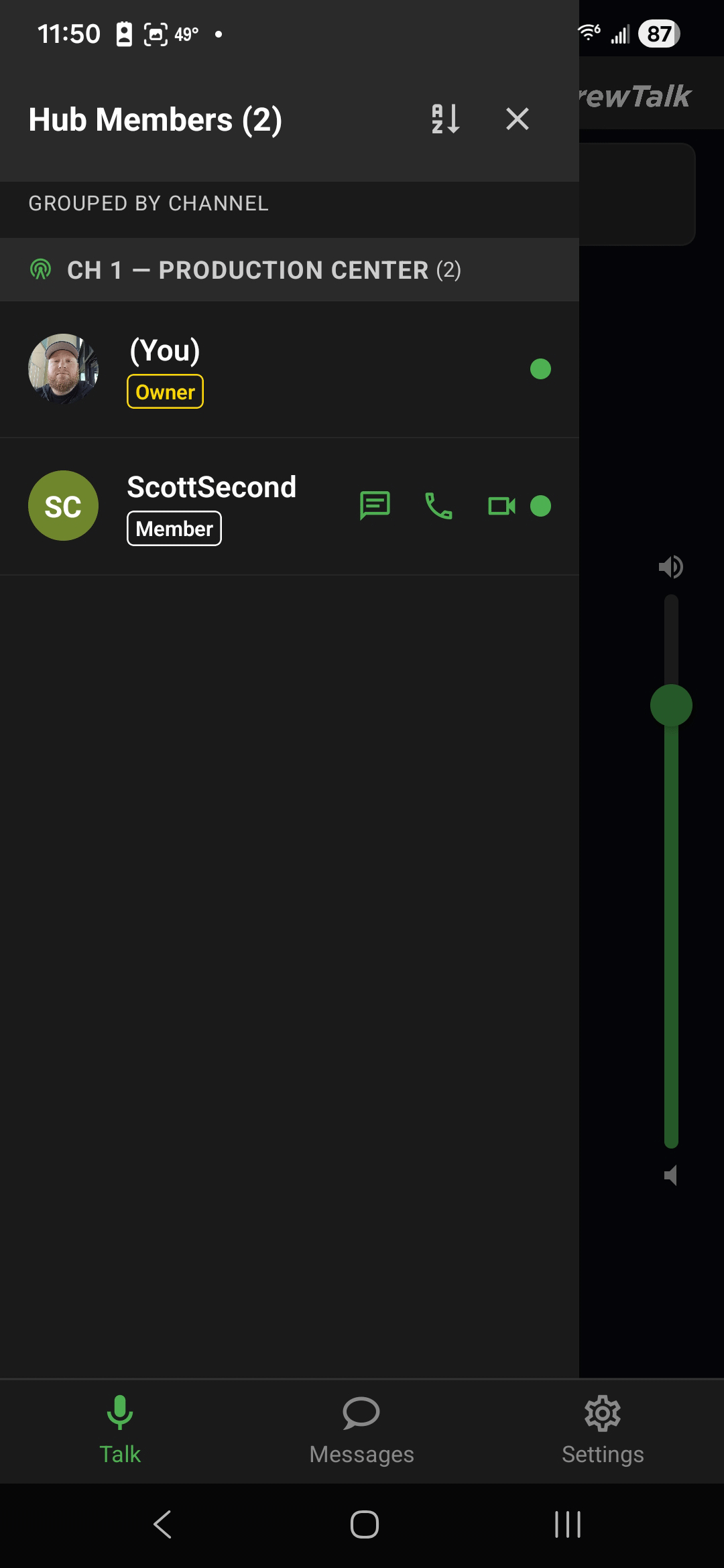
Members Directory
On a busy production, knowing who's on what channel — and whether they're actually connected — is the difference between a smooth operation and chaos. The Members Directory gives you a live roster of every person in your hub, grouped by their current channel, with real-time online status indicators. Each member row shows their role (Owner, Admin, or Member), and puts one-tap actions at your fingertips: send a direct message, start a Whisper call, or initiate a Live-Sight video session. No digging through menus — just tap the person, tap the action.
- Live roster grouped by channel — see who's where at a glance
- Green presence dots show who's connected and ready in real time
- One-tap actions: message, Whisper call, or Live-Sight video from any member row
- Role badges (Owner, Admin, Member) for clear chain-of-command visibility
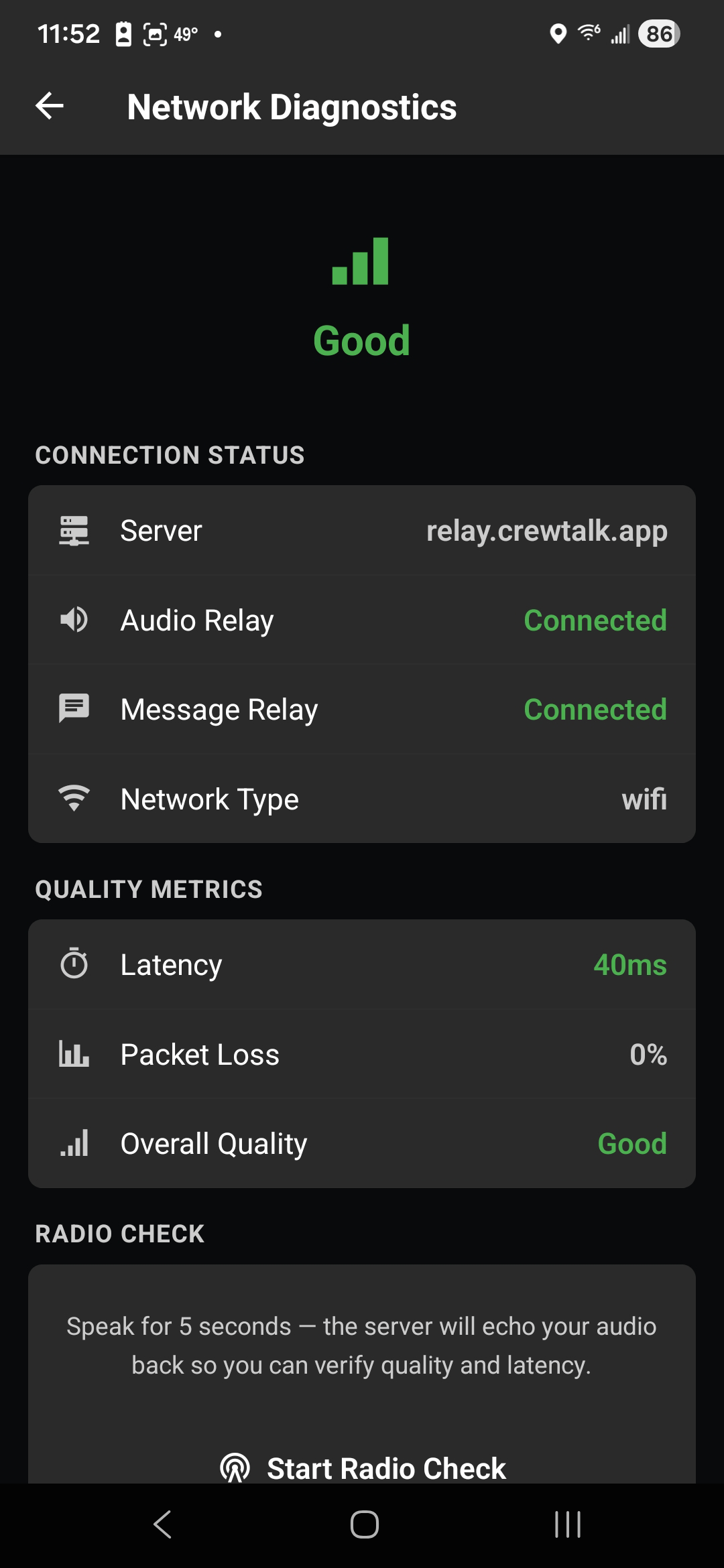
Real-Time Network Diagnostics
When comms get choppy, you need to know why — fast. CrewTalk's built-in Network Diagnostics screen gives you a complete picture of your connection health in real time. See your audio relay status, message relay status, network type, latency in milliseconds, packet loss percentage, and an overall quality rating — all on one screen. No guesswork, no "is it my phone or the network?" And when you need absolute confirmation that your audio is getting through, the Radio Check feature lets you record a five-second clip that the server echoes back so you can hear exactly what your team hears.
- Live connection status for audio relay, message relay, and network type
- Quality metrics dashboard: latency, packet loss, and overall quality rating
- Radio Check — record and echo back your audio to verify what your team actually hears
- Diagnose issues on the spot — no more guessing if it's your phone or the network
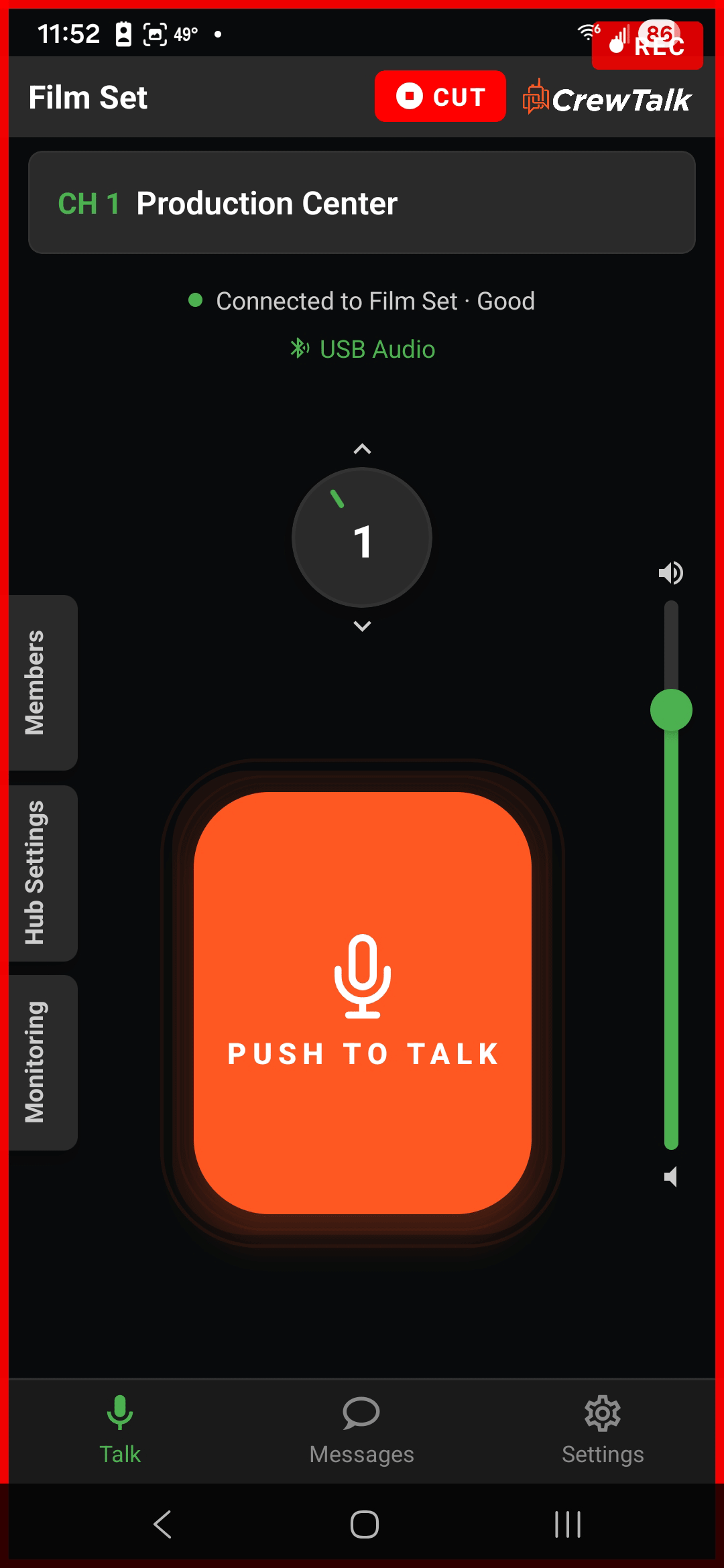
Tally Light Trigger
In live production, a tally light tells everyone in the room which camera is hot. CrewTalk brings that concept into your comms workflow — and connects it directly to your camera system. When the tally light is triggered, every connected device gets a bold red border and a "REC" indicator — an unmistakable visual signal that you're live. A "CUT" button in the header lets the director or technical director kill the tally with a single tap. Already compatible with Blackmagic cameras, with more systems on the way, CrewTalk bridges the gap between your switcher and your crew's phones. It's a simple feature that solves a real problem: making sure the entire crew knows the exact moment they're on air, and the exact moment they're clear.
- Red border and "REC" indicator displayed on every connected device simultaneously
- One-tap "CUT" button for the director to kill the tally instantly
- Gated to admin roles — only authorized crew can trigger or clear the tally
- Compatible with Blackmagic cameras today — more systems coming soon
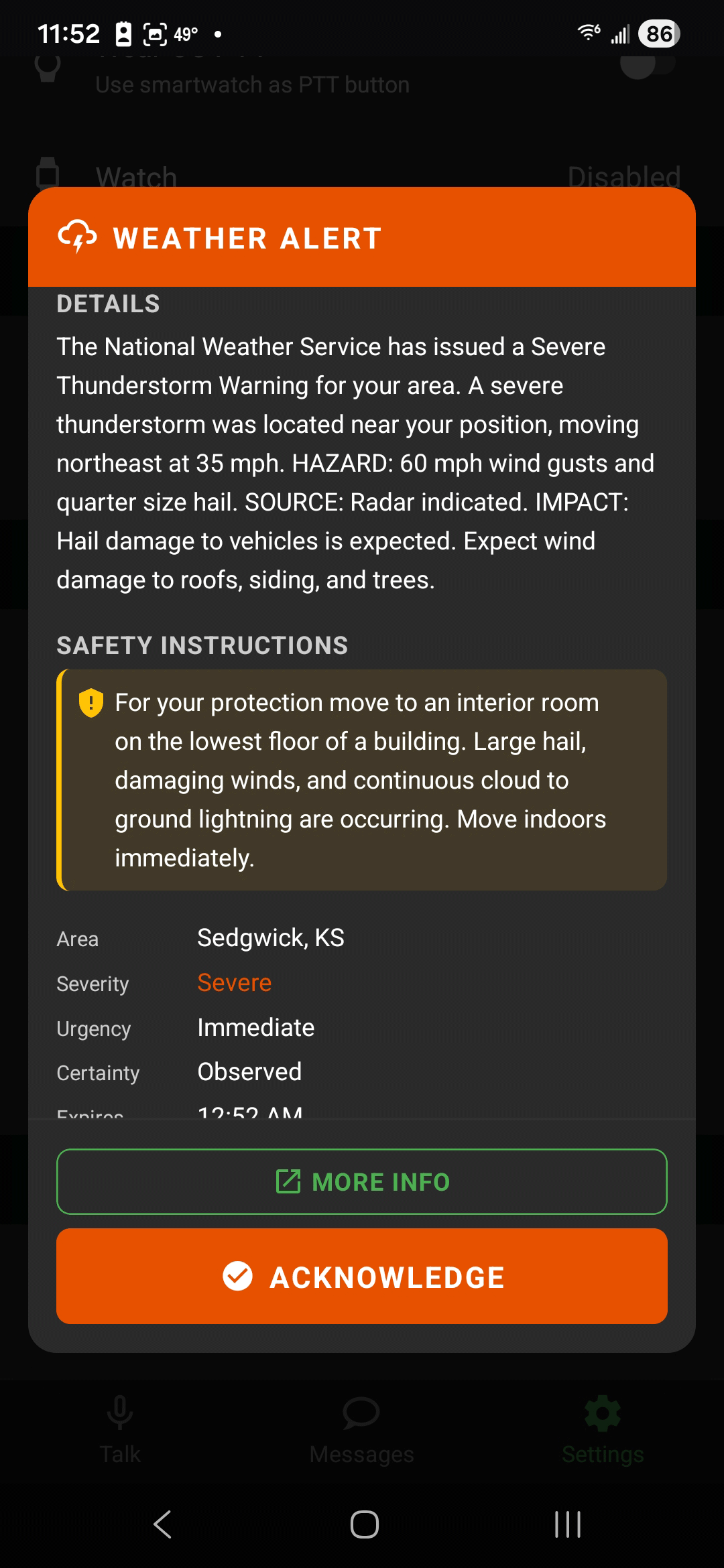
Weather Alerts — Safety First, Automatically
When the National Weather Service issues a severe thunderstorm warning for your area, you can't afford to wait for someone to check their phone. CrewTalk pulls real-time NWS alerts based on your hub's location and delivers them as full-screen overlays to every connected member — complete with hazard details, safety instructions, severity level, and urgency classification. The alert requires an "ACKNOWLEDGE" tap to dismiss, ensuring no one misses a critical weather event. For outdoor productions, construction sites, sporting events, and any operation exposed to the elements, this feature isn't a convenience — it's a liability shield.
- Real-time NWS alerts delivered as full-screen overlays to every connected device
- Detailed hazard info, safety instructions, area, severity, and urgency in every alert
- Mandatory acknowledgment ensures every crew member sees the warning
- "More Info" link to the full NWS report for deeper situational awareness
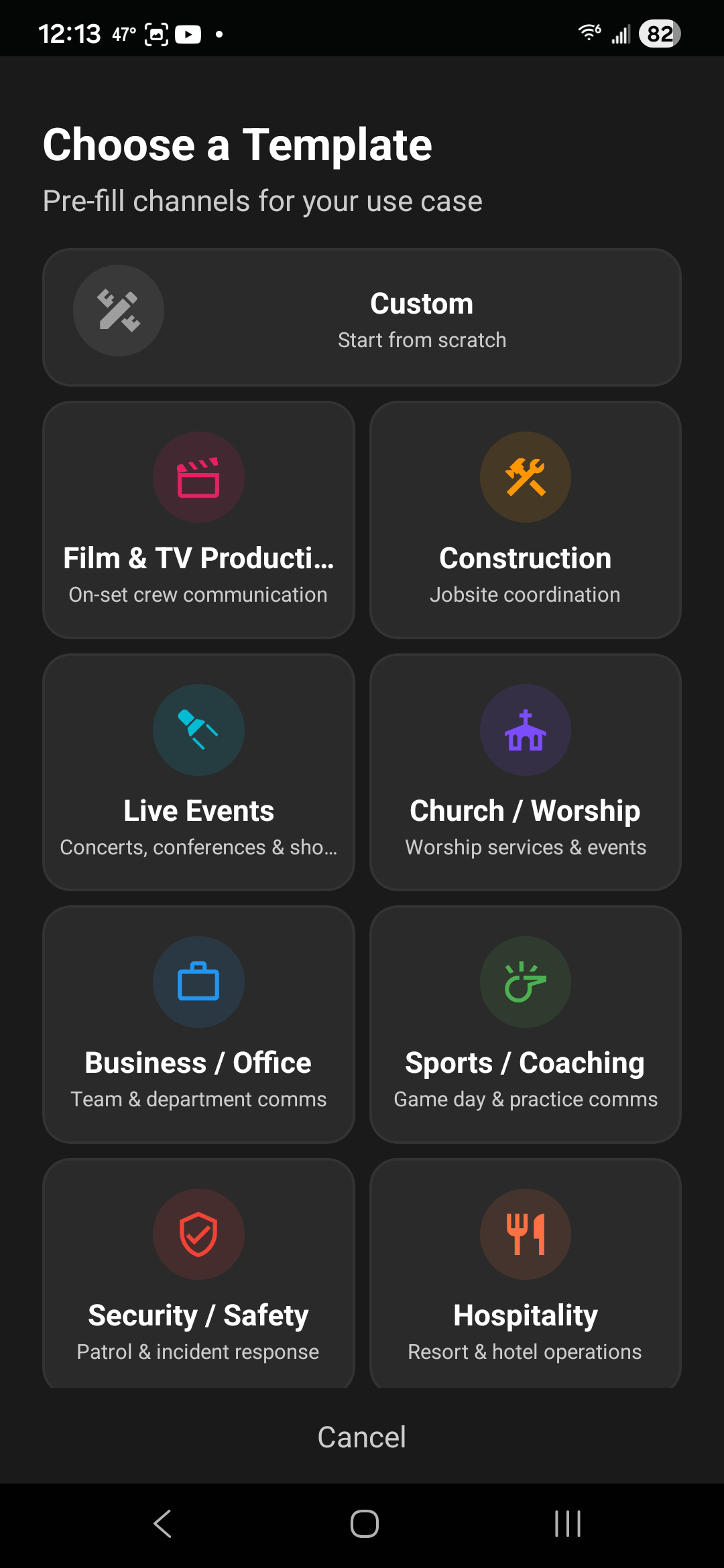
Hub Templates — Ready to Talk in Seconds
Every industry has its own channel structure. A film set needs Camera, Sound, Lighting, Grip, and Electric. A construction site needs Superintendent, Crane, Concrete, and Safety. Instead of setting up channels from scratch every time, Hub Templates let you pick your industry and get a pre-configured hub with the right channel names, the right number of channels, and smart defaults — all in a single tap. Choose from Film & TV Production, Construction, Live Events, Church & Worship, Business, Sports & Coaching, Security, or Hospitality. Or start from scratch with a custom blank template. Either way, you're talking in under a minute.
- Eight industry templates — Film, Construction, Events, Church, Business, Sports, Security, Hospitality
- Pre-filled channel names and structure tailored to each industry's workflow
- Custom option for teams that want to build their own channel layout from scratch
- One tap to create — go from zero to a fully structured hub in under a minute

Bluetooth & Smartwatch PTT
On a real set, your phone should stay out of the way. CrewTalk supports push-to-talk from Bluetooth headset buttons and Wear OS smartwatches, so you can transmit without ever touching your screen. Pair any standard Bluetooth headset and the media button becomes your PTT trigger. For smartwatch users, a large PTT button on your wrist communicates with your phone with no additional setup. Double-press on either activates Latch Talk for hands-free broadcasting. If your Bluetooth disconnects, PTT automatically falls back to on-screen and re-enables when the connection restores.
- Works with any standard Bluetooth headset or media button
- Wear OS companion app — PTT from your wrist
- Automatic fallback to on-screen if Bluetooth disconnects
- Double-press activates Latch Talk — hands-free on hardware too

Local Mode — No Internet Required
Film sets in warehouses. Construction sites in dead zones. Event venues with overloaded cell towers. Internet isn't always an option, but communication still has to work. CrewTalk's Local Mode uses your WiFi network to deliver PTT audio without a single byte leaving your building. No cloud server, no internet connection, no cellular signal required — just a WiFi router and your team's phones. Set it up with a scannable QR code, and every device on the network joins automatically. When you move back into coverage, switch to Internet Mode and pick up right where you left off.
- Zero internet dependency — works on any WiFi network
- QR code setup — scan and join in seconds
- Switch between Local and Internet modes without losing your hub setup
- Perfect for remote locations, basements, and areas with no cell service

Auto Noise Gate
Wind machines, generators, traffic, HVAC hum — production environments are loud, and nobody wants to hear your background noise on the channel. CrewTalk's noise gate analyzes your ambient noise in real time and filters it out automatically. When you press PTT, only your voice gets transmitted. A smart holdover prevents your words from getting clipped. And because the threshold auto-calibrates to your actual environment, there's nothing to adjust — it just adapts.
- Auto mode learns your ambient noise level — zero manual tuning
- Smart holdover prevents end-of-sentence clipping
- Manual override available if you prefer fine-grained control
- Runs independently — zero performance hit to the app

Always Connected — Even in Your Pocket
A communication tool that dies when you lock your screen isn't a communication tool. CrewTalk runs an always-on background connection that stays alive even when the app isn't visible. A persistent notification shows which hub you're connected to. If the connection drops — from a network blip, a tunnel, or an elevator ride — auto-reconnect kicks in silently. You put your phone in your pocket at call time, and it's still connected at wrap.
- Stays connected when your phone is locked or another app is in focus
- Auto-reconnect handles dropouts silently — you never lose contact
- Battery-optimized — guided setup to prevent aggressive power-saving interference
- Persistent notification shows your connected hub at a glance

QR Code Invites — Onboard in Seconds
The fastest comms system in the world is useless if it takes twenty minutes to get everyone connected. CrewTalk generates QR codes that link directly to your hub. A new crew member scans the code and they're in — validated, added, and on Channel 1 ready to talk. For crews without cameras handy, a six-character code works just as well. Hub owners control access with expiration windows and usage limits. Revoke any code instantly if someone leaves the production.
- Scan a QR code or enter a short code — join a hub in under 10 seconds
- Configurable expiry (1 day, 7 days, 30 days, or never) and usage limits
- Revoke any code instantly — full access control
- Deep link support — crewtalk:// links work from texts, emails, or print